Extract and consolidate bank statement data
Convert statement images and PDFs into validated transactions, balances, and account-level summaries you can review and export.

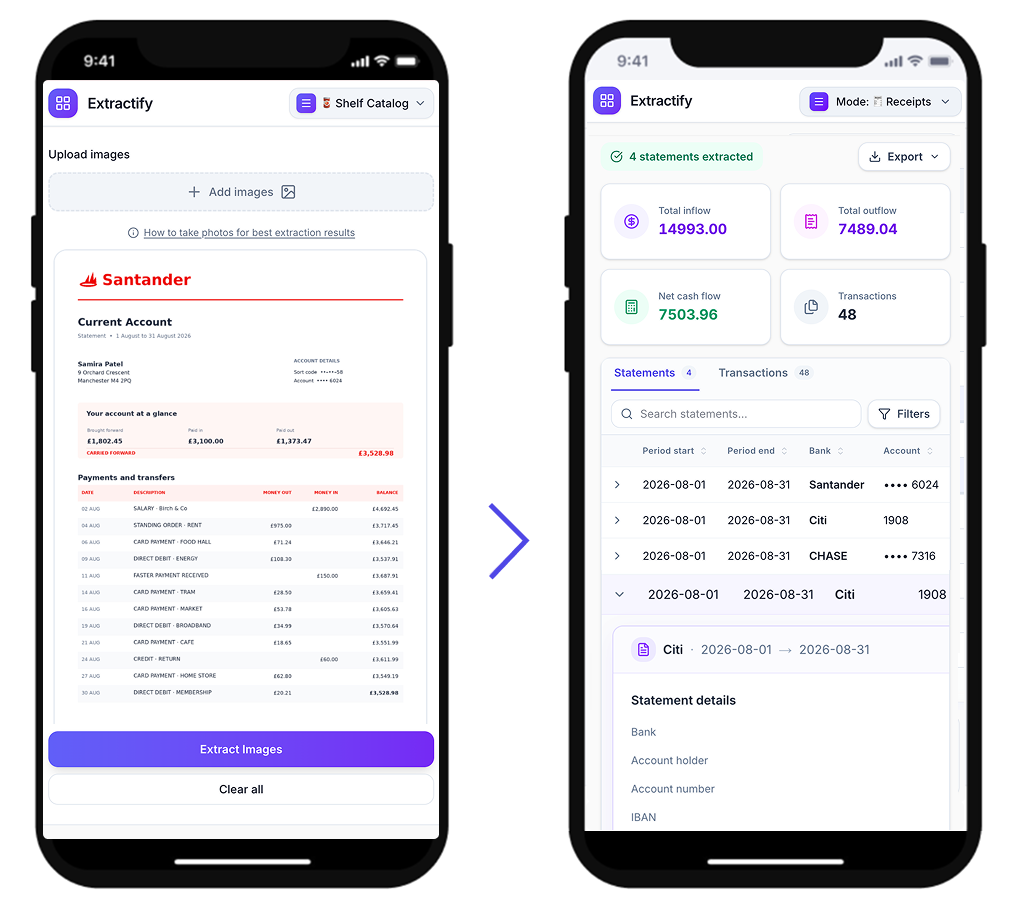
Upload statement images or PDFs and automatically extract:
- Statement period start and end dates
- Bank and account identifiers
- Opening and closing balances
- Transaction rows with date, description, and reference
- Debit, credit, and signed amount values
- Running balance per transaction when available
Review extracted statements and transactions, then export to CSV or Excel.

How to extract bank statement data
- 🏦Step 1
Upload one or more bank statement images or PDFs
- 🔎Step 2
Extractify detects statement fields, balances, and transaction rows
- ✅Step 3
Review and validate extracted values in statements and transactions tabs
- 📥Step 4
Export statements and transactions to CSV or Excel
Who uses bank statement extraction?
Accounting and bookkeeping teams · Finance operations teams · Auditors and controllers · Small business owners · Independent professionals
Bank statement data is often locked in PDFs or scanned files, making consolidation and reconciliation manual and time-consuming.
Extractify converts those files into structured statement and transaction data, so teams can review faster, validate balances, and export clean records for reporting workflows.

FAQ
What data can Extractify extract from bank statements?
Extractify can extract statement-level data such as bank name, account number, statement period, opening and closing balance, currency, total inflow and outflow, plus transaction-level data including date, description, reference, debit, credit, amount and running balance when available.
Does Extractify support multi-page bank statements?
Yes. Multiple pages belonging to the same statement can be processed together and represented as one statement with its full transaction list.
Can I process several bank statements at once?
Yes. You can upload multiple statements in one batch and review them together in the same workspace.
Can I review and correct extracted data?
Yes. Extracted statement and transaction data can be reviewed and edited before export.
How can I export the data?
You can export a Statements CSV with one row per statement and a Transactions CSV with one row per transaction.
Does it work with scanned statements and phone photos?
Yes. Extractify supports PDFs, scans, screenshots and photos, provided the document is readable.
What happens if some information is missing from the statement?
Missing fields are left empty rather than invented. Extractify only returns data that can be extracted or reliably calculated from the document.
What data can be extracted from a bank statement?
Extractify can extract bank name, account number, statement period, opening balance, closing balance, currency, transaction dates, descriptions, references, debit amounts, credit amounts and running balances when present.
Is Extractify a bank statement parser?
Yes. Extractify can be used as an AI bank statement parser to turn unstructured bank statement PDFs and images into structured tables.
Bank statement tools
- Convert bank statements to Excel
- Prepare bank statements for Google Sheets
- Convert bank statements to CSV
- Convert bank statements to QuickBooks
- Combine bank statements in Excel
- Extract invoice data
- Extract receipt data
- Extract credit card statement data
- Convert image tables to spreadsheet data
- Build a custom extraction workflow