How Electricians Can Turn Jobsite Photos Into Structured Excel Reports

Electricians and electrical contractors take jobsite photos for good reasons: to record an installation, capture a component label, document a problem, show completed work, or give the office an update.
The problem starts afterward. A folder containing 60 photos is visual evidence, but it is not yet a usable report. Someone still has to identify what each photo shows, connect it to a room or system, describe the work, and copy the details into Excel.
That gap matters. A study by Autodesk and FMI estimated that inaccurate, incomplete, inaccessible, or inconsistent data may have cost the global construction industry $1.85 trillion in 2020. Better jobsite reporting begins with turning field evidence into information that people can find, review, and act on.
This guide explains three ways to convert electrical jobsite photos into structured Excel reports, including a photo-to-spreadsheet workflow for larger batches.
What is a structured electrical jobsite report?
A structured report gives every relevant observation its own row and every type of information its own column. Instead of scrolling through a camera roll, a project manager can filter the report by location, component, status, date, or outstanding issue.
| Image | Status | Location | Component | Problem faced | Work completed |
|---|---|---|---|---|---|
| 1 | Completed | Electrical room B2 | Control panel | — | Internal wiring completed |
| 2 | Issue identified | Generator room | Damper actuator | Mounting bolt damaged | — |
| 3 | In progress | Panel C2 | Controller | Network connection unavailable | Database installed |
The report does not need every field populated in every row. Leaving an uncertain value blank is better than turning a guess into a project record.
Method 1: Enter the photo details manually in Excel
The simplest method is to create an Excel template, open each photo, and type the relevant information into a new row.
A basic manual workflow
- Put the jobsite photos into one project folder.
- Rename them in a consistent order, such as
project-area-001. - Create the required columns in Excel.
- Review every photo individually.
- Add one row for each distinct component, issue, or completed task.
- Link each row to its source image.
- Review the final sheet with the electrician or supervisor who performed the work.

Manual entry gives you complete control and works well for a small service visit with five or ten photos. It becomes slower when a technician returns with dozens of images or when one photo contains several visible components.
The main risk is inconsistency. One person may write “installed,” another “complete,” and another “done.” Locations and component names can also vary between entries, making the spreadsheet harder to filter later.
Use dropdown lists for common fields such as status, system type, and follow-up priority. This keeps the report cleaner even when the description itself remains free text.
Method 2: Use Extractify to turn the photos into structured rows
When the electrician already has a batch of jobsite photos, an AI image-data extraction workflow can reduce the initial transcription work.
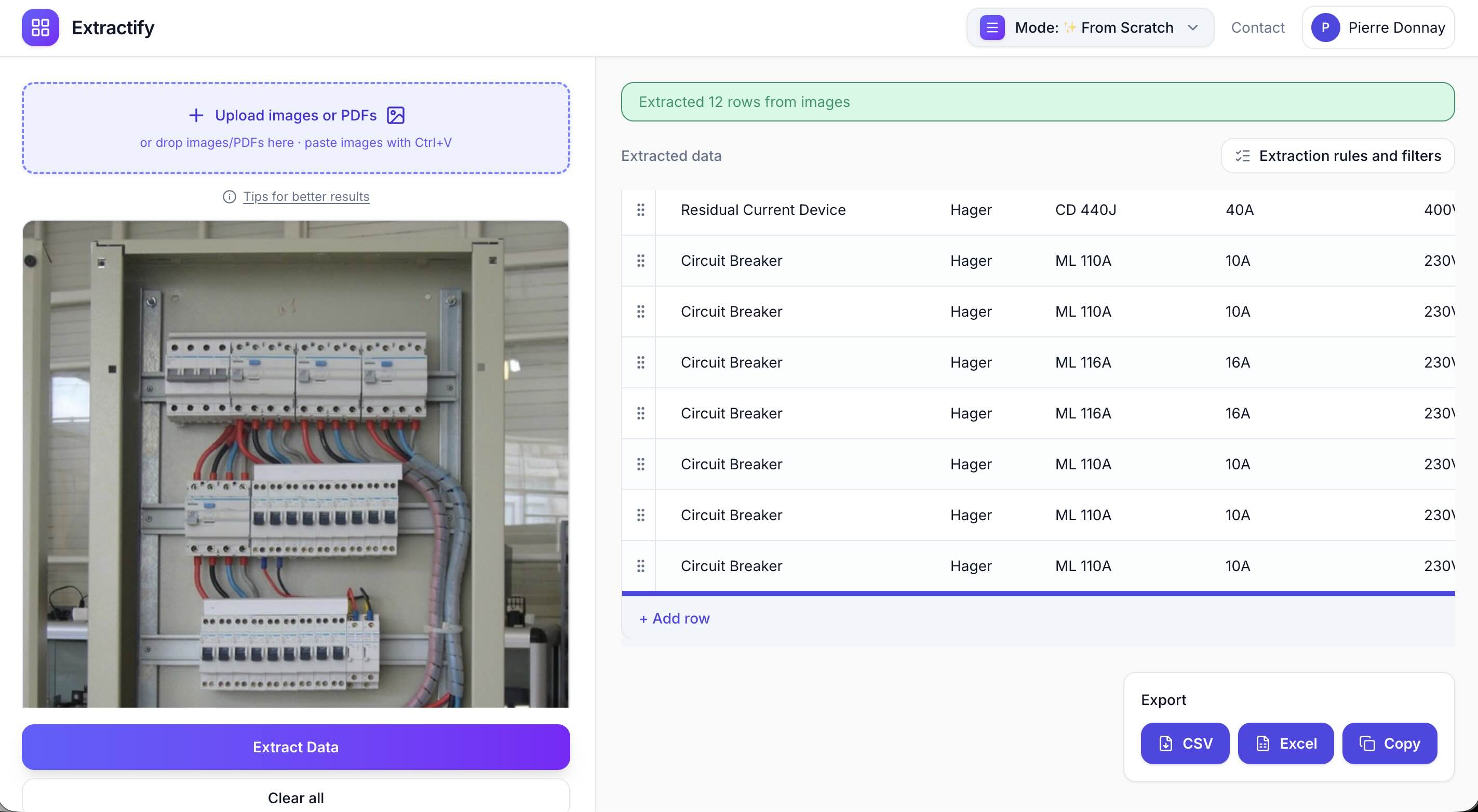
Extractify's custom workflow accepts photos, screenshots, and PDFs, reads visible text and visual context, and organizes the result into an editable table. You can review the rows before exporting them to CSV or Excel.
When your source is mainly software captures rather than phone photos, use this walkthrough for extracting structured data from screenshots.
Pricing note: Extractify has a free version.
The workflow is simple:
- Upload the photos. Group images from the same job, visit, or area into one batch.
- Set the columns. Let Extractify detect the relevant columns automatically, or specify fields such as Image, Status, Location, Component, Problem Faced, Work Completed, and Follow-up Required.
- Describe the output. Ask Extractify to create one row for each visible component, issue, or completed task, read visible labels and annotations, and leave uncertain values blank.
- Review the results. Check locations, references, dates, and work status against the original photos.
- Export the report. Download the reviewed table as an Excel or CSV file.
Method 3: Use an electrical field-reporting or construction documentation app
A dedicated field platform is better when the company needs photo capture, task management, standardized reports, and collaboration in one system. Real examples include:
| Tool | Best for | Relevant features | Price indication |
|---|---|---|---|
| CrewBox | Electrical crews documenting panels, conduit, grounding, and concealed work | Time- and GPS-tagged photos, annotations, offline capture, tasks, and PDF reports | Free plan for one user and five projects; Solo starts at $35 per month |
| Raken | Electrical contractors needing daily reports across crews | Photos, work logs, tasks, checklists, time tracking, and branded PDF reports | Free trial; paid Basic and Performance plans use custom pricing |
| Procore | Larger projects involving contractors, subcontractors, and project owners | Photo organization, permissions, markups, drawing links, document storage, and project-wide collaboration | Custom annual pricing based on products and construction volume; no public starting price |

These platforms require more setup than a spreadsheet extraction tool. They make sense for recurring company-wide reporting, but may be excessive when the immediate job is converting an existing photo batch into Excel.
Choose the method based on the workflow you need:
| Situation | Best starting method |
|---|---|
| Fewer than ten photos and a one-off report | Manual Excel entry |
| Existing photo batch that needs to become editable rows | Structured extraction with Extractify |
| Recurring reporting across multiple crews and projects | Dedicated field-reporting platform |
How electricians should photograph a jobsite for better reporting
The quality of the output begins with the photos. A clear image is easier for both a supervisor and an extraction tool to interpret.
Capture context before detail
Take one wide photo that establishes the room, cabinet, or equipment area before taking close-ups. A label may be readable in a close-up but impossible to connect to the right panel without a context image.
Photograph labels straight on
Model numbers, panel references, cable markers, and controller labels are easier to read when the camera is parallel to the surface. Avoid strong reflections and check that the text remains legible when you zoom in.
Use one issue per close-up when possible
If the purpose of the photo is to document a loose connection, missing actuator, damaged fastener, or labeling problem, frame the issue clearly. Add an annotation or a short written note when the visual evidence alone would be ambiguous.
Keep identifiers consistent
Use the same room, panel, and system names across photos, annotations, and spreadsheets. “B2 Electrical,” “Elec B2,” and “Electrical Room B2” may refer to the same location, but inconsistent naming makes filtering and matching harder.
Remove sensitive information before wider use
Electrical rooms and control systems may reveal customer names, facility layouts, network information, access details, or critical-infrastructure identifiers. Review the images before uploading them, sharing the report, or using them in marketing content. Crop or redact anything that the recipient does not need.
What AI photo reporting cannot safely determine
Photo extraction can organize visible information, but it should not be presented as an electrical inspection.
A photo alone generally cannot confirm:
- code compliance;
- conductor condition inside concealed areas;
- torque values;
- insulation resistance;
- voltage, current, or continuity;
- correct protection settings;
- whether testing or commissioning was completed;
- whether equipment is safe to energize.
Those conclusions require qualified people, appropriate instruments, project documentation, and the applicable inspection or testing process.
The safe division of work is straightforward: use AI to create a structured draft from visible evidence, then have the electrician or responsible supervisor verify the record.
A reusable electrical photo-report checklist
Before exporting the spreadsheet, confirm that:
- every row points to the correct source image;
- project and customer identifiers are correct;
- locations use one consistent naming system;
- component names and visible model numbers have been checked;
- completed work is separated from outstanding work;
- problems and follow-up actions are clearly distinguished;
- blank fields have not been replaced with guesses;
- safety, compliance, and testing statements were verified by a qualified person;
- sensitive information has been removed from external copies;
- the final file has a clear project name and report date.
Frequently asked questions
Can jobsite photos be converted directly into Excel?
Yes. The information visible in jobsite photos can be organized into rows and columns and then exported to Excel or CSV. The result should always be reviewed because image quality, incomplete context, and small labels can produce missing or incorrect values.
What should an electrical jobsite photo report include?
At minimum, include the image reference, location, component or work item, status, issue observed, work completed, and required follow-up. Add the technician, project, date, system type, and asset reference when those fields are relevant and verified.
Can one photo create multiple report rows?
Yes. A cabinet photo may show several controllers, terminal blocks, labels, or issues. Define each distinct component or work item as a separate row when the report needs component-level detail.
Is this the same as an electrical inspection report?
No. A structured photo report organizes visible evidence. It does not prove electrical safety, code compliance, test results, or approval by a licensed professional.
Should electricians use Excel or field-reporting software?
Excel is flexible and easy to share. A dedicated field platform is better for recurring company-wide processes such as assignments, signatures, audit trails, and standardized customer reports. Photo-to-table extraction sits between them: it helps convert existing images into spreadsheet-ready data without requiring a full field-management system.
Final thoughts
The demand for organized electrical documentation will not shrink. The U.S. Bureau of Labor Statistics projects electrician employment to grow 9% between 2024 and 2034, with about 81,000 openings per year. As more work is performed across more sites, photo folders alone will become increasingly difficult to review and reuse.
For a handful of photos, manual entry may be enough. For recurring company-wide reporting, a dedicated field platform may be justified. Between those two options, structured image extraction provides a practical way to turn existing electrical jobsite photos into an editable Excel report.
The important step is still human review. Use the photos as evidence, use structured extraction to reduce transcription, and let a qualified person confirm what the final project record says.
For related workflows, see how to extract data from charts and graphs and how to extract tables from a PDF.