Convert bank statements to Excel
Upload bank statement PDFs or images and turn transactions, balances, and account details into editable Excel data.

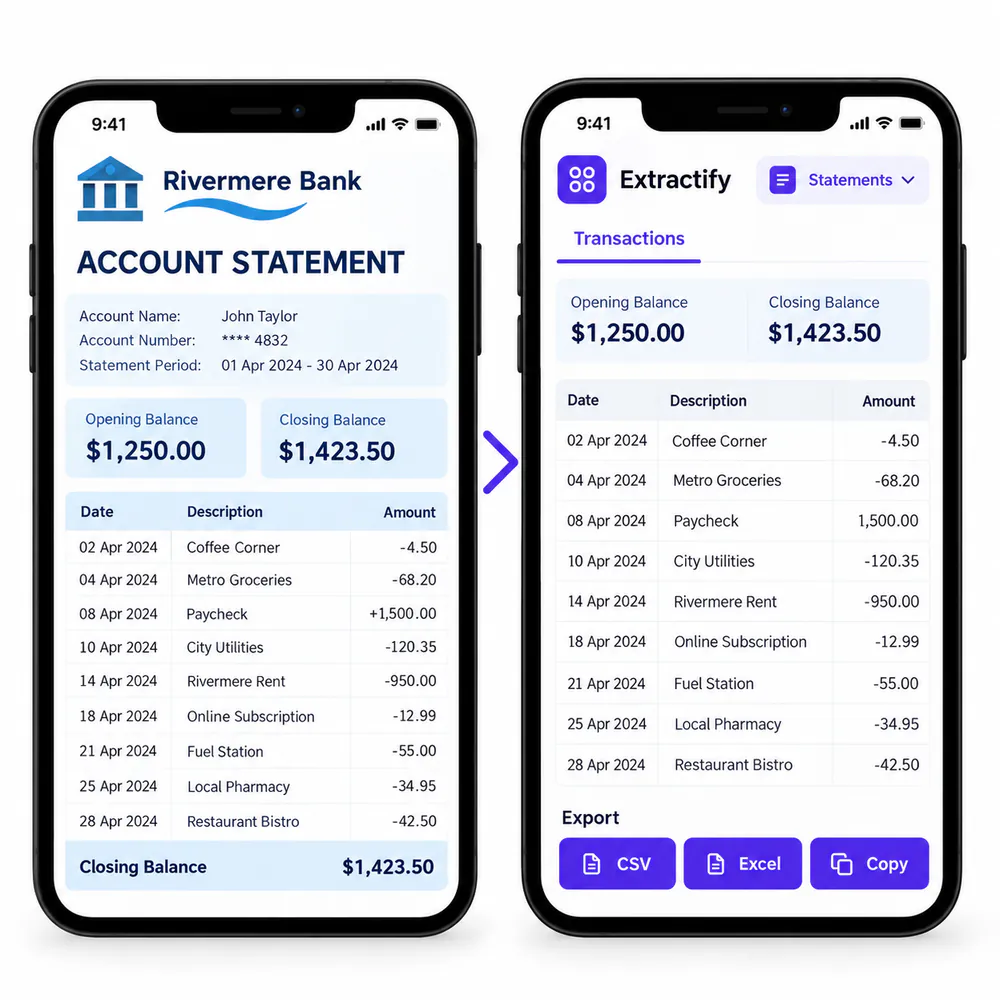
What bank statement data is added to Excel?
- Bank and account details
- Statement dates and balances
- Transaction dates and descriptions
- Debit and credit amounts
- Running balances when shown
Check the results, then download your Excel workbook.

How bank-statement-to-Excel conversion works
- 🏦Step 1
Upload bank statement PDFs, scans, or images
- 🔎Step 2
Extractify identifies statement details and transaction rows
- ✍️Step 3
Review the data and correct any unclear values
- 📊Step 4
Download an Excel workbook with statements and transactions
Why convert bank statements to Excel?
Bookkeepers · Accountants · Small-business owners · Finance teams · Auditors
Bank statements are often locked in PDFs or scans. Converting them to Excel makes it easier to sort transactions, check balances, group expenses, and prepare financial records without typing every row manually.
The workbook keeps statement summaries separate from transaction rows. Review unclear descriptions, dates, amounts, and balances against the original statement before using the data in an accounting workflow.

FAQ
Can I convert a PDF bank statement to Excel?
Yes. Upload a digital or scanned PDF bank statement, review the extracted data, and download an editable Excel workbook.
Does the Excel file include every transaction?
Yes. Each visible transaction is placed on its own row with its date, description, reference, debit, credit, amount, and running balance when available.
Can I convert several bank statements at once?
Yes. Upload multiple statements in one batch and export them together in one workbook.
Can I edit the bank statement data before export?
Yes. Review and correct statement details, transactions, and balances before downloading the file.
Which sheets are included in the Excel file?
The workbook contains a Statements sheet for statement-level details and a Transactions sheet for individual transaction rows.
Does it work with scanned statements and photos?
Yes. You can upload readable scans, screenshots, or phone photos as well as PDF statements.