Extract data from supplier invoices automatically
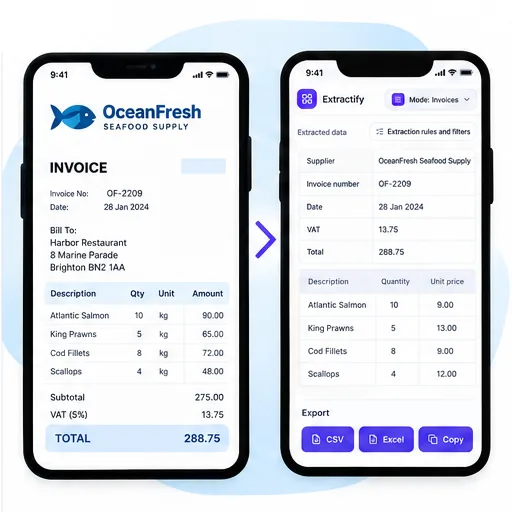
Upload supplier invoice PDFs or images and get the details in an editable table.

What data can I extract from supplier invoices?
- Supplier name and address
- Invoice and purchase order numbers
- Invoice date and due date
- Products, quantities, and prices
- Taxes and total amount
Get the same columns for every supplier.

How supplier invoice extraction works
- 🏢Step 1
Upload invoices received from one or many suppliers
- 🔍Step 2
Extractify interprets each layout and identifies equivalent fields
- 🔗Step 3
Review supplier names, references, line items, and totals together
- 📥Step 4
Export standardized data for matching, analysis, or import preparation
Who needs standardized supplier invoice data?
Accounts-payable departments · Procurement teams · Multi-location businesses · Distributors and wholesalers · Finance teams consolidating supplier spend
Supplier invoices rarely follow one layout. A PO number may appear in the header, below the delivery address, or beside the payment terms. Tax summaries and freight charges can also be positioned differently, and item descriptions may wrap across several lines. Fixed-position copy-and-paste processes struggle when vendors change their templates.
Extractify identifies the meaning of visible fields rather than expecting every value in one coordinate. The resulting table can support supplier matching, PO reconciliation, spend analysis, and import preparation. Human review remains important when supplier identities are similar, references are truncated, tax jurisdictions differ, or a credit note changes the amount payable.

FAQ
What is supplier invoice extraction?
Supplier invoice extraction turns information from invoice PDFs or images into an editable table. It saves you from copying each field manually.
What invoice data can I extract?
You can extract the supplier name, invoice number, dates, products or services, quantities, prices, taxes, and total amount when they appear on the invoice.
Can I extract data from PDF invoices?
Yes. You can upload PDF invoices, scanned invoices, screenshots, and invoice photos.
Can I upload several supplier invoices at once?
Yes. Upload several invoices in one batch and review the extracted data together.
Can I edit the extracted invoice data?
Yes. Check the results and correct any value before downloading your file.
Can I export supplier invoices to Excel?
Yes. Download the extracted invoice data as an Excel or CSV file.
Does it work with different invoice layouts?
Yes. You can process invoices from different suppliers without creating a separate template for each design. Always review unclear or low-quality documents.