Automate repetitive invoice data entry
Convert batches of invoice documents into structured, editable fields so your team can focus on validation and exceptions instead of retyping every value.

Automate invoice data entry:
- Upload PDFs, scans, or photos
- Extract invoice details
- Turn line items into rows
- Review and edit the results
- Export to Excel or CSV
Save time without losing control.

A review-first invoice automation workflow
- 📥Step 1
Collect and upload the invoices in your current batch
- ⚙️Step 2
Extractify converts document fields and item tables into structured data
- 👀Step 3
A reviewer resolves ambiguous cells and checks important totals
- ➡️Step 4
Export the approved data for the next step in your process
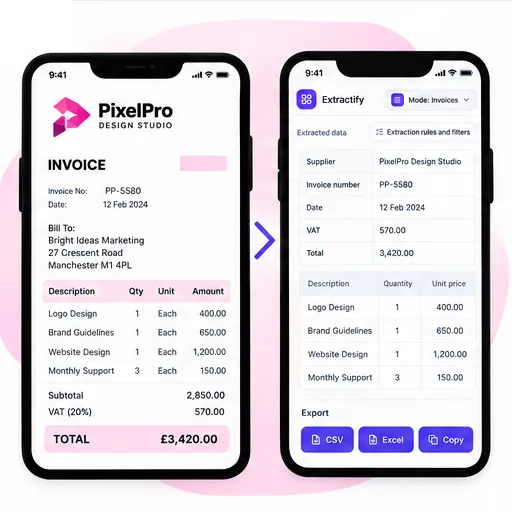
Where invoice data-entry automation saves time
Finance teams handling recurring invoice batches · Shared-service and back-office teams · Operations teams maintaining cost trackers · Agencies processing client documents · Businesses replacing spreadsheet retyping
Manual invoice entry combines repetitive work with high-consequence details. A transposed invoice number, missed decimal, wrong date, or line placed under the wrong supplier can interrupt approvals and reconciliation later. The burden grows when invoices arrive through several inboxes and in inconsistent formats.
Extractify automates document-to-table transcription while keeping a visible review step. This is deliberately different from unattended posting: people can compare extracted fields with the source, correct uncertain values, and decide whether an invoice is ready for the downstream process. The structured export can then feed a spreadsheet, approval queue, database import, or accounting preparation workflow according to your own controls.

FAQ
What is invoice data entry automation?
It turns invoice PDFs or images into editable data, so you do not have to type every field by hand.
What invoice information can be entered automatically?
Extractify can capture supplier names, invoice numbers, dates, products or services, quantities, prices, taxes, and totals when they appear on the invoice.
Can I automate data entry from PDF invoices?
Yes. Upload PDF invoices, scans, screenshots, or clear invoice photos.
Can I process several invoices at once?
Yes. Upload a batch of invoices and review the extracted data together.
Can I check and edit the results?
Yes. Review every field and correct any value before downloading your file.
Can I export the invoice data to Excel?
Yes. Download the results as an Excel or CSV file.
Does it work with different invoice layouts?
Yes. Invoices can come from different suppliers and use different designs. Review unclear or low-quality documents before using the data.