Convert invoices to Google Sheets in seconds
Upload invoices and get clean data ready for Google Sheets.

What invoice data is added to Google Sheets?
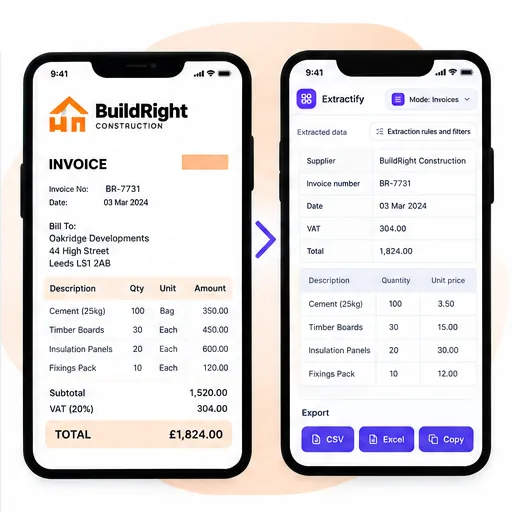
- Supplier name and invoice number
- Invoice date and due date
- Products or services
- Quantities, prices, and taxes
- Total amount
Check the results, then download your file for Google Sheets.

From invoice upload to Google Sheets
- 📤Step 1
Upload invoice PDFs, scans, or phone photos
- 🧾Step 2
Extract document fields and item rows into a consistent schema
- ✅Step 3
Review totals, dates, currencies, and uncertain cells
- 📗Step 4
Download XLSX or CSV and open or import it in Google Sheets
Why teams organize invoice data in Google Sheets
Distributed finance teams · Virtual assistants · Freelancers tracking supplier costs · Operations and procurement teams · Bookkeepers collaborating with clients
Google Sheets is convenient for a shared invoice register, approval tracker, or lightweight spend report, but the source documents still need to become rows and columns first. Pasting text from PDFs usually loses item boundaries and creates inconsistent fields from one supplier to the next.
Extractify structures the visible invoice data before it reaches the Sheet. You can validate the invoice number, supplier, dates, item rows, taxes, and totals in the extraction workspace, then import an XLSX or CSV file. After import, your team can add ownership, approval status, account codes, comments, formulas, and dashboards without retyping the original invoices.

FAQ
Can multiple invoices become one Google Sheets dataset?
Yes. Upload a batch and export consistent records together. Each invoice remains identifiable through its document information, while the item table contains the individual products or services associated with it.
Can I choose the invoice columns before importing?
Yes. Review the automatically detected fields and adjust the table before export. You can retain the supplier, invoice number, date, due date, PO reference, tax, totals, and line-item fields that are relevant to your Sheet.
Can collaborators correct invoice values after import?
Yes. The downloaded values remain ordinary spreadsheet cells. We recommend correcting extraction issues before export and using normal Google Sheets permissions or protected ranges if several collaborators will edit the register.
Does this replace an accounting system?
No. It prepares structured invoice information for review and collaboration. Your accounting process should still apply the appropriate supplier matching, tax treatment, approval controls, account coding, and posting rules.
Can Extractify send invoices directly to Google Sheets?
The current workflow does not require or request direct access to your Google account. Extract the invoice data, download XLSX or CSV, then open or import that file in Google Sheets. This keeps you in control of the destination spreadsheet and its sharing permissions.
Which format should I import into Google Sheets?
XLSX is useful when you want document summaries and line items preserved in a workbook. CSV is suitable when you need one flat table or want to append rows to an established Sheet. Google Sheets can open both formats.